
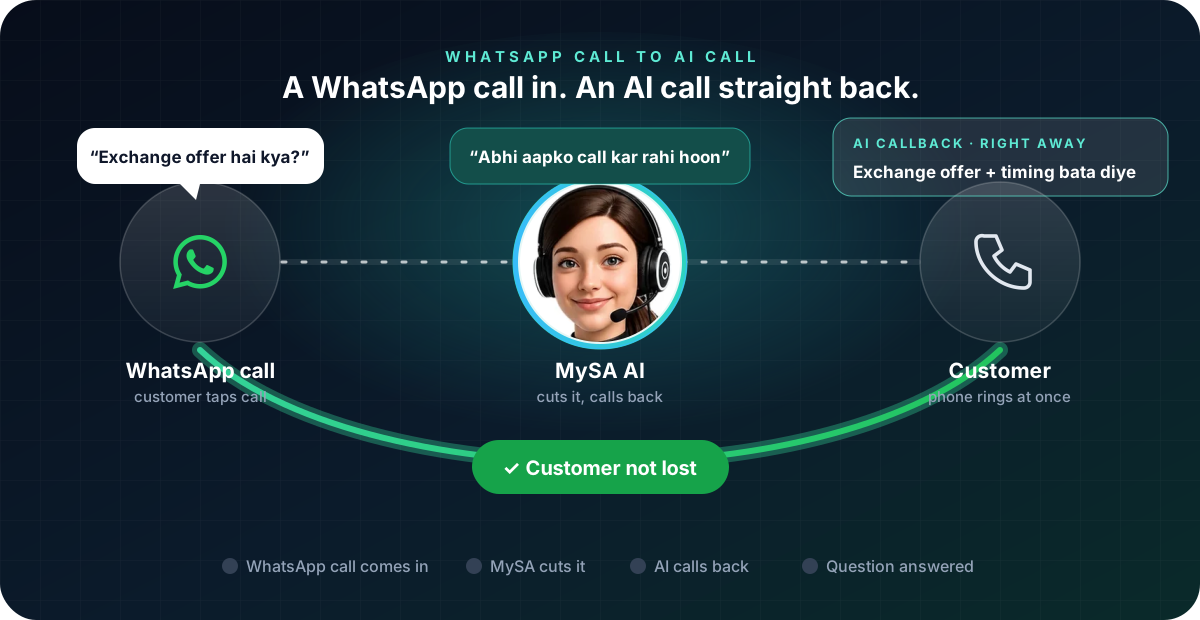
WhatsApp missed call auto reply means a customer who calls your WhatsApp number is never left ringing: as soon as the WhatsApp call comes in, MySA cuts it and the AI rings the customer straight back on a normal phone call, with an optional WhatsApp message on top. It is a setting on any WhatsApp number connected to MySA Business, alongside smart replies, and it works whether you are at the counter, on another call or closed for the night.
Why WhatsApp calls need this
More and more customers tap the call button inside WhatsApp instead of dialling. For a busy shop or a one-person office that means:
- The phone rings while your hands are full. A customer at the counter, a delivery, a meeting.
- The caller does not leave a message. They call the next business on their list.
- Nobody notices until later. A missed WhatsApp call sits among dozens of chats.
A missed call usually means a question about a price, a timing or a booking. Answering it quickly matters more than answering it yourself.
What happens when a WhatsApp call comes in
The AI cannot talk on a WhatsApp call itself, so it does the next best thing. With Missed call auto-reply switched on for a connected number, MySA cuts the WhatsApp call as soon as it arrives and then does what you chose:
- Text the caller back with your Auto-reply message, for example "Aapki WhatsApp call aayi. Hum abhi aapko normal call kar rahe hain."
- AI voice callback, a real AI phone call back to the customer, placed straight away, with its own language, maximum duration, purpose, cooldown and daily limit per number. It is billed at your call rate.
- Only outside working hours, if you want calls during your working hours (IST) to ring through to your phone as usual, and the auto-reply to take over only after hours.
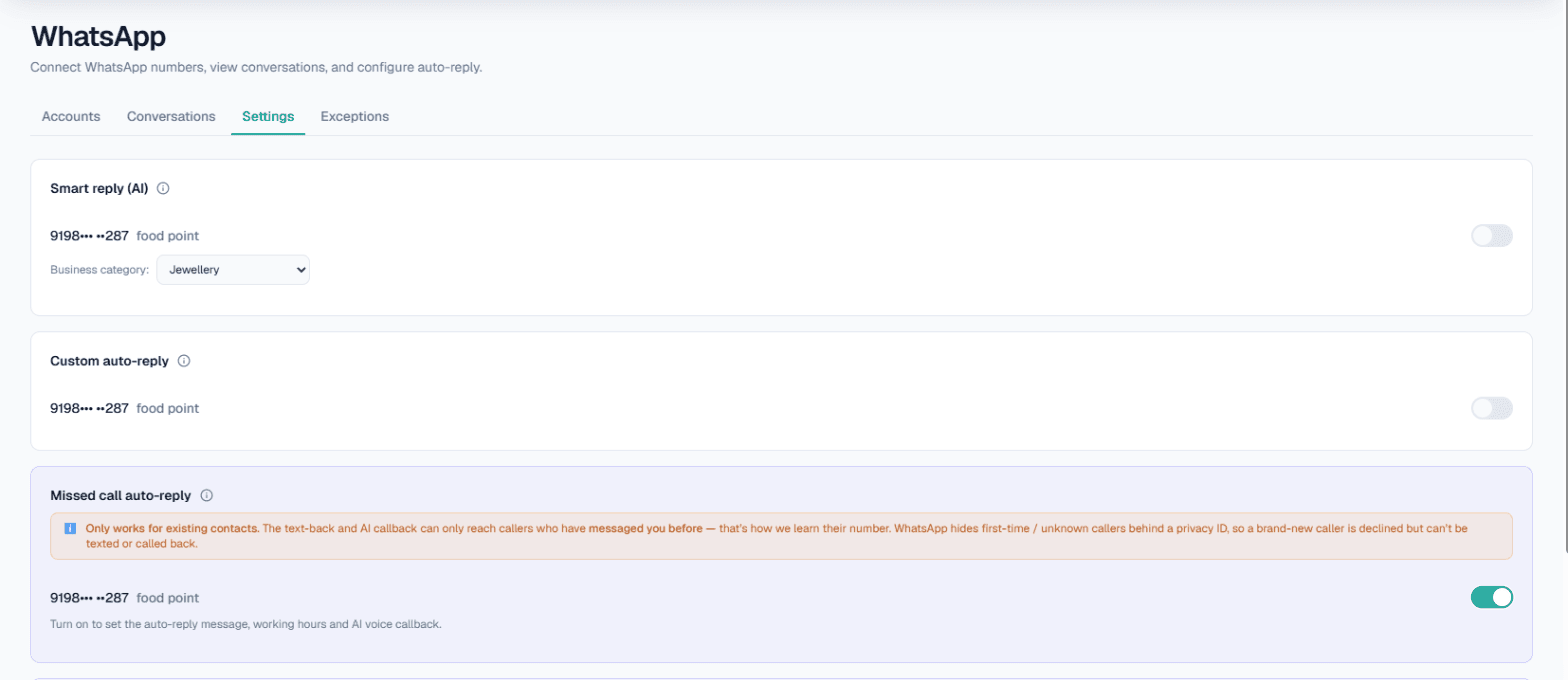
You set this per number in WhatsApp → Settings, on the Missed call auto-reply card.
The one limit to know first
The text-back and the callback only reach callers who have messaged your WhatsApp number before. That is how MySA learns their number: WhatsApp hides first-time callers behind a privacy ID, so a brand-new caller is declined but cannot be texted or called back. The settings card says the same thing, so nobody is surprised.
In practice this suits businesses whose customers already chat with them: repeat buyers, enquiries that started on WhatsApp, customers who saved your number from a broadcast or an earlier order.
A missed WhatsApp call, as the customer hears it
Example
(A customer WhatsApp-calls a mobile shop at 6 PM. The call is cut at once, and the customer's phone rings a moment later.)
Auto-reply on WhatsApp: Aapki WhatsApp call aayi. Hum abhi aapko normal call kar rahe hain.
AI, calling back: Namaste, main ABC Mobiles se bol rahi hoon. Aapne abhi WhatsApp par call kiya tha, bataiye kaise madad karoon?
Customer: Naye phone ka exchange offer hai kya? Aur shop kab tak khuli hai?
AI: Exchange ke rules hamari details mein hain, main bata deti hoon. Shop raat 9 baje tak khuli hai.
The shop is made up. The AI answers only from your Business Details; if the customer asks something those details do not cover, it says it will find out instead of guessing, and the question waits for your answer in Follow-ups. The callback appears in Call Logs with its recording and an AI summary.
Keep family and staff out of it
Nobody wants an auto-reply sent to their own family. In WhatsApp → Exceptions, list the numbers the AI should leave alone, such as family, staff or suppliers. They get no automatic replies, no Auto-Call and no missed-call text or callback, and their calls ring through to you. Their messages still appear in Conversations.
How it fits with your other WhatsApp replies
Missed call auto-reply handles calls. The rest of your WhatsApp is handled by its own settings:
- Smart reply (AI) answers messages from your Business Details, in the customer's language.
- Custom auto-reply sends a fixed message instead, or as a fallback.
- WhatsApp Auto-Call places an AI call right after a customer messages you, where your workspace has it enabled.
The full picture is in WhatsApp auto reply for business and the WhatsApp documentation. Calls to an ordinary business phone number are a different case: there the AI can pick up the call itself, which is covered in our guide to an AI receptionist for business.
What works today, and what it does not do
| Works today | Does not do |
|---|---|
| The WhatsApp call cut, and an AI phone call straight back | Talk on the WhatsApp call itself |
| An AI callback with your purpose, cooldown and daily limit | Reach first-time callers hidden behind a privacy ID |
| Auto-reply only outside working hours, if you choose | Send an SMS for a missed call |
| Family and staff left alone through Exceptions | Work on a WhatsApp number that is not connected to MySA |
Getting started
- Create a workspace and verify your mobile number to get ₹100 of Test credit in the separate Test environment.
- Write your Business Details: prices, timings, offers and policies, so the AI's answers are yours.
- Connect your WhatsApp number with a pairing code or QR scan, under WhatsApp → Accounts.
- In WhatsApp → Settings, switch on Missed call auto-reply, write the message, and choose whether the AI calls back.
- Add family and staff to Exceptions, then call your WhatsApp number from a phone that has messaged it before, to see the text and the callback.
Calls of 10 seconds or less are free; longer calls are billed per started minute, and missed-call callbacks come out of the same prepaid wallet as any other call. The rate for your workspace is shown in the console. Talk to sales for volume pricing.