
AI calling for jewellery shops means an AI voice assistant takes and makes the routine phone calls of a showroom: the "aaj ka rate kya hai?" calls, festive invitations to past buyers, visit confirmations and order-ready calls. In MySA Business it answers from details you approved, reads today's rate from your own system if you connect one, and hands a serious buyer to the owner when they ask for a person. Your staff keep the counter; the AI keeps the phone.
The calls a jewellery shop makes and takes
Most of a showroom's phone time goes into a few kinds of call, and each one is short:
- Rate enquiries. A family checks the rate before a wedding purchase or before exchanging old gold, and then rings the jeweller they trust for that shop's rate.
- Festive invitations. Before Dhanteras, which falls on 6 November in 2026, past customers are told about a new collection or an offer.
- Visit confirmations. A customer who said "Saturday ko aayenge" is rung on the day.
- Scheme and order calls. A savings-scheme instalment is due, or a repaired chain or custom order is ready.
The rest of this article takes these one at a time. If your customers mostly message rather than call, read WhatsApp automation for jewellery shops first; this piece is about the phone.
Today's rate on a phone call, from your own system
The rate is the one answer the AI must never guess, and it does not. There are two ways it can know yours.
- From your own rate API. If your billing or ERP software already has an API, the workspace Owner adds it under Integrations → My APIs (Custom APIs are enabled per workspace). On outbound calls it is fetched just before each call and handed to the AI as facts. On inbound, you tick it under Live data (your APIs) on the number, so a caller asking for the 22K rate hears the figure your system returns.
- Without an API. The AI answers from your Business Details: making charges, schemes, exchange rules, timings. It does not invent a rate, so it can tell the caller to confirm the day's rate at the counter.
How the live data works, including caching and what happens when your API does not respond, is in AI calls with real-time data and the Custom APIs documentation.
Example: an inbound rate call
Caller: Namaste, aaj 22 carat ka kya rate chal raha hai?
AI: Namaste. Hamare system ke hisaab se aaj 22K gold [rate from your API] per gram hai. Making charge design ke hisaab se alag lagta hai. Kya aap showroom aakar designs dekhna chahenge?
Caller: Haan, Sunday ko aate hain.
AI: Bahut accha, Sunday ko milte hain.
The bracket stands for whatever your API returns. Afterwards, the call appears in Call Logs with the recording, an AI summary, sentiment and tags, and the Sunday visit is picked up for a reminder call if you have Visit reminders switched on.
Festive calls before Dhanteras
Calling every past buyer in one afternoon floods the counter with callbacks. A Scheduled campaign takes one contacts file and calls it over several days instead:
| Option | Use it for |
|---|---|
| Split over days | A long list of past buyers, a fixed number each day |
| On dates I pick | The whole list again on chosen dates, such as a week before Dhanteras and two days before |
| Every few days | A short list called again every few days, a set number of times |
Each day or round becomes its own campaign with its own test call, pause, stop and report. The list is an Excel or CSV file, and columns named var1 to var15 let each call carry its own details. The purpose "Aapka {var1} wala order taiyaar hai" with var1 = gold chain is spoken as "Aapka gold chain wala order taiyaar hai". The same works for a scheme instalment date. The setup is in Campaigns.
Calls are never placed inside your DND hours; they are held until the window ends.
Turning a "Sunday ko aayenge" into a visit
Jewellery is still bought in the showroom, so the job of most calls is a visit. MySA has two features for the two ways a customer puts it:
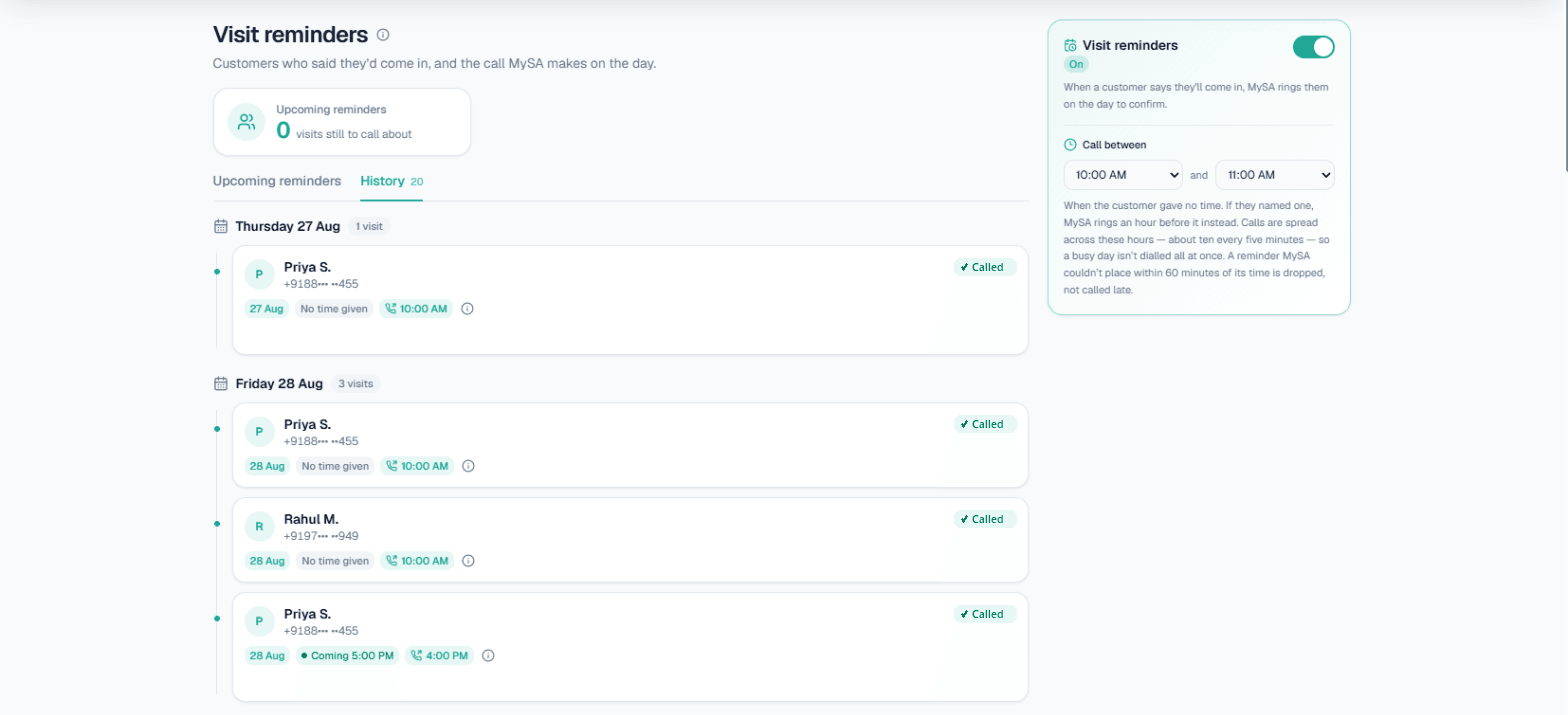
- Visit reminders. A plan the customer mentioned ("main Sunday aaungi") is noted from the call, and MySA rings on that day to confirm: an hour before the time they gave, or inside your Call between window if they named only a day. It is off until you switch it on. See Visit reminders.
- Follow-ups. A call-back the customer asked for ("shaam ko call karna") is scheduled for that time and can be dialled automatically with Auto-callback. See Follow-ups.
When a buyer wants the owner
A bridal set or a large gold purchase is often a conversation the owner wants to have personally. With Call transfer, you add named numbers such as "Owner" or "Showroom manager" with a one-line "when to transfer here", for example "when they want to buy a bridal set or ask for a discount". When a caller asks for a person or the conversation matches, the AI rings that number, briefs your colleague first (in Hinglish unless you choose another language), and then connects the two.
Transfer works on inbound and outbound calls, in your Live workspace, and the minutes your colleague is on the line are billed separately at the transfer rate shown on the card. Details are in Call transfer.
What to put in your Business Details
The AI can only be as good as what it answers from. For a jeweller, that usually means:
- How making charges are worked out for chains, bangles, rings and bridal sets.
- Your gold savings scheme: monthly amount, duration and what the customer gets at the end.
- Old gold exchange and buy-back rules.
- Hallmarking. Since 1 April 2023, gold jewellery sold in the districts where hallmarking is mandatory must carry a 6-digit HUID, and customers do ask. Say how your pieces are hallmarked and that the HUID can be checked in the BIS Care app.
- Diamond certificates, return and exchange policy, timings, branches, parking and the weekly off day.
Anything the AI could not answer is not guessed: it becomes an Action required follow-up. You type the answer once, and the AI calls the customer back with it.
What works today, and what it does not do
| Works today | Does not do |
|---|---|
| Today's rate read live from your own API, on inbound and outbound calls | Publish market rates or invent a rate |
| Charges, schemes and policies from your approved Business Details | Quote a discount you did not write down |
| Festive lists spread over days or repeated on dates you pick | Send SMS or email |
| Visit reminder calls and follow-ups at the time the customer asked | Keep turn-by-turn transcripts (recording and summary only) |
| Handing a buyer to a named person on your team | Promise how natural a language sounds; hear it on a test call |
Getting started
- Create a workspace and verify your mobile number to get ₹100 of Test credit in the separate Test environment.
- Build your Business Details with your charges, schemes, hallmarking and exchange rules, and approve them.
- Press Try now: the AI rings your own phone. Ask it the questions your customers ask.
- If you have a rate API, ask for Custom APIs to be enabled and add it under My APIs.
- Go Live, top up the prepaid wallet, and set up inbound calls on your number or a Scheduled campaign for your festive list.
Calls of 10 seconds or less are free; longer calls are billed per started minute. The rate for your workspace is shown in the console. Talk to sales for volume pricing.