
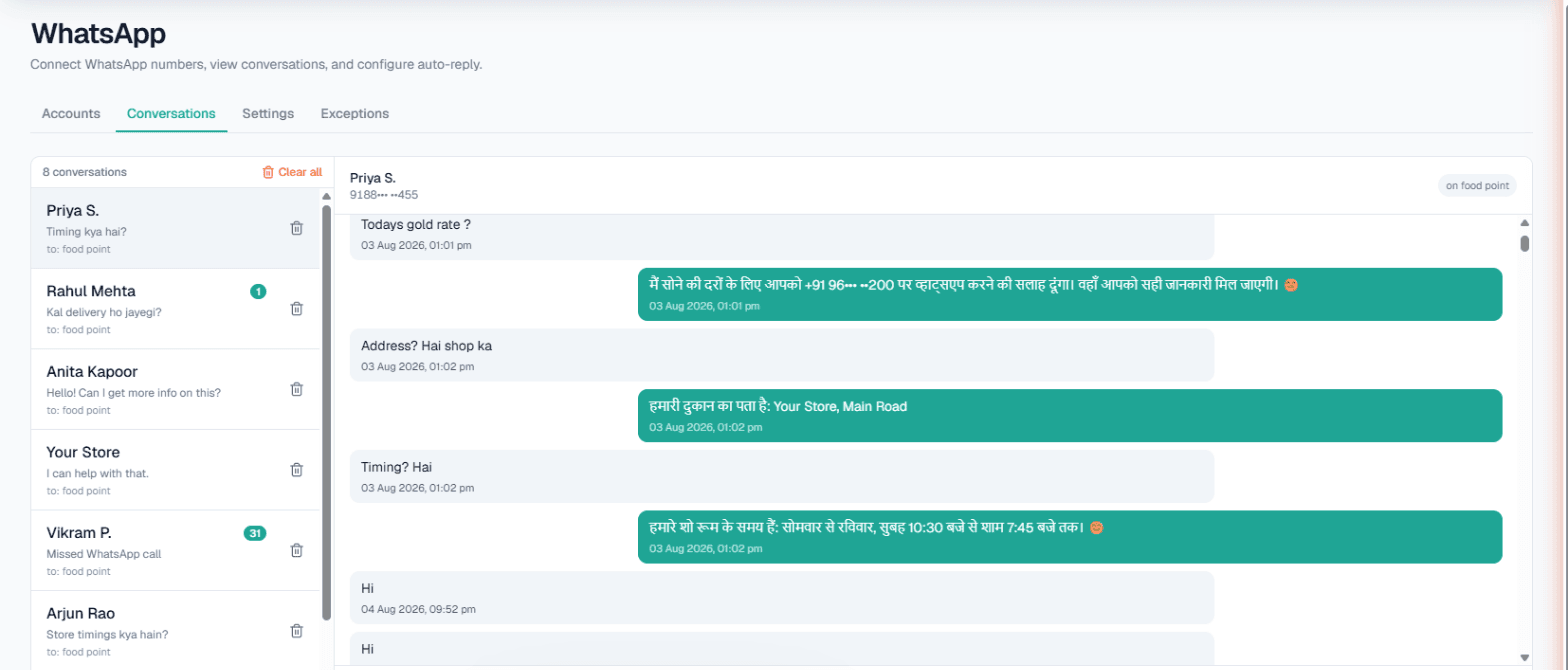
WhatsApp automation in Kerala means your business number answers customer messages by itself: an AI reads each chat, replies from the details you approved, and can turn a serious enquiry into a phone call. For a homestay, a clinic, a jewellery shop or a coaching institute, that is the difference between a guest who books tonight and one who books with whoever replied first. Customers can write in Malayalam, English or another language, and the AI answers in the language they write in.
Why WhatsApp automation in Kerala is worth a look
A lot of business in Kerala already happens on WhatsApp. Guests ask a homestay for photos and tariffs, patients ask a clinic for timings, families ask a jeweller about a design they saw. The messages arrive at all hours, often from people in other states or abroad, and many are the same five questions.
Answering by hand works until the season gets busy; then replies slip to the next morning and the enquiry has moved on. Automation keeps the first answer instant, while your team handles the chats that need a person.
How it works with MySA Business
You link your existing WhatsApp number with a pairing code or a QR scan, through WhatsApp's own Linked Devices screen, the same way you would link WhatsApp Web. No developer is needed. Then you switch on what you want, per number:
- Smart reply (AI). Each incoming message is answered from that number's Business Details, in the customer's language. The AI answers only from what you approved, so it does not invent a tariff or a policy.
- Custom auto-reply. A fixed message, used when the AI is off or as a fallback.
- Missed-call auto-reply. The AI cannot pick up a WhatsApp voice call, so a missed call is followed by a text, and optionally an AI voice callback. WhatsApp only exposes callers who have messaged you before, so first-time callers cannot be texted back.
- Keyword Auto-Call. A message containing a keyword you chose, such as booking or rate, can be answered with an AI phone call instead of a text.
- Call when the customer agrees. When the AI spots a real prospect asking about price, booking, availability or a visit, it asks once whether your team may call. On a yes, an AI call goes out in their language with a summary of the chat. On a no, it keeps helping in the chat and does not ask again.
Every chat stays in the Conversations inbox, where your team can reply by hand at any time. The full setup is in the WhatsApp documentation, and the feature overview is on WhatsApp Smart Reply.
Kerala businesses that tend to benefit
These are scenarios, not case studies. They show how the same tools fit different kinds of work.
- Tourism, homestays and houseboats. Guests plan trips to the backwaters, hill stations and beaches from far away, and they message at odd hours. The AI can answer room types, check-in times and what is included, and use Today's update for things like "Monsoon package available this week."
- Clinics and Ayurveda centres. Patients ask about doctors' timings, treatments and fees. With Appointments set up, a booking made on an AI call sends the patient WhatsApp messages for confirmation, a reminder three hours before, and any change or cancellation.
- Gold and jewellery shops. Customers ask about today's rate and making charges. If you have your own rate API, the AI can read it before answering, so the reply is today's figure, not last week's.
- Education and coaching. Parents and students ask about batches, fees and entrance-coaching schedules. The AI answers from your details and asks interested families if a counsellor may call.
An example from a homestay
Example
Guest: Hi, do you have a room for two from the 14th to 16th? What is the rate?
AI: Yes, we have a garden-view double room for those dates at the rate in our current tariff, breakfast included. Check-in is from 12 noon. Would you like our team to call you to confirm the booking?
Guest: Yes, please call.
An AI call goes out in the language the guest was writing in, opening with a summary of what they asked.
If the guest had said no, the AI would simply keep answering in the chat. At most one such chat-started call a day goes to the same number, across WhatsApp, Instagram and Facebook together.
Malayalam on chats and calls
On chats, there is nothing to set: a customer who writes in Malayalam gets a reply in the language they wrote in, and the same goes for English, Hindi or Hinglish.
For phone calls, the language is chosen per campaign, per test call and per inbound number, and Malayalam can be chosen as the call language. We recommend you place a free Test call in Malayalam to your own phone and hear it before you switch anything on for customers. If you also want AI to answer your phone line, read AI calling software in Kochi.
What works today, and what it does not do
| Works today | Does not do |
|---|---|
| AI replies from your Business Details, in the customer's language | Listen to voice notes (the customer gets a fallback message you set) |
| Missed-call text-back and optional AI voice callback | Contact first-time callers WhatsApp hides behind a privacy ID |
| Keyword Auto-Call and call-on-consent, with gaps and daily caps | Send email or SMS to customers |
| A shared inbox your team can reply from | Hand a chat to a person automatically |
| An exceptions list for family and staff numbers | Reply to everyone on your contact list unprompted |
Calls also respect your DND hours: a call that falls inside the window is held until it ends, not lost.
Getting started
- Sign up and verify your mobile number. Every workspace gets a separate Test environment, with ₹100 of Test credit once the owner's mobile is verified.
- Fill in your Business Details: services, timings, fees, location.
- Connect your WhatsApp number, switch on Smart reply, and message it from another phone.
- Use Try now to ring your own phone and hear an AI call in Malayalam or English.
- When it sounds right, top up the Live wallet and go live. There is no subscription; calls are billed from a prepaid wallet.