
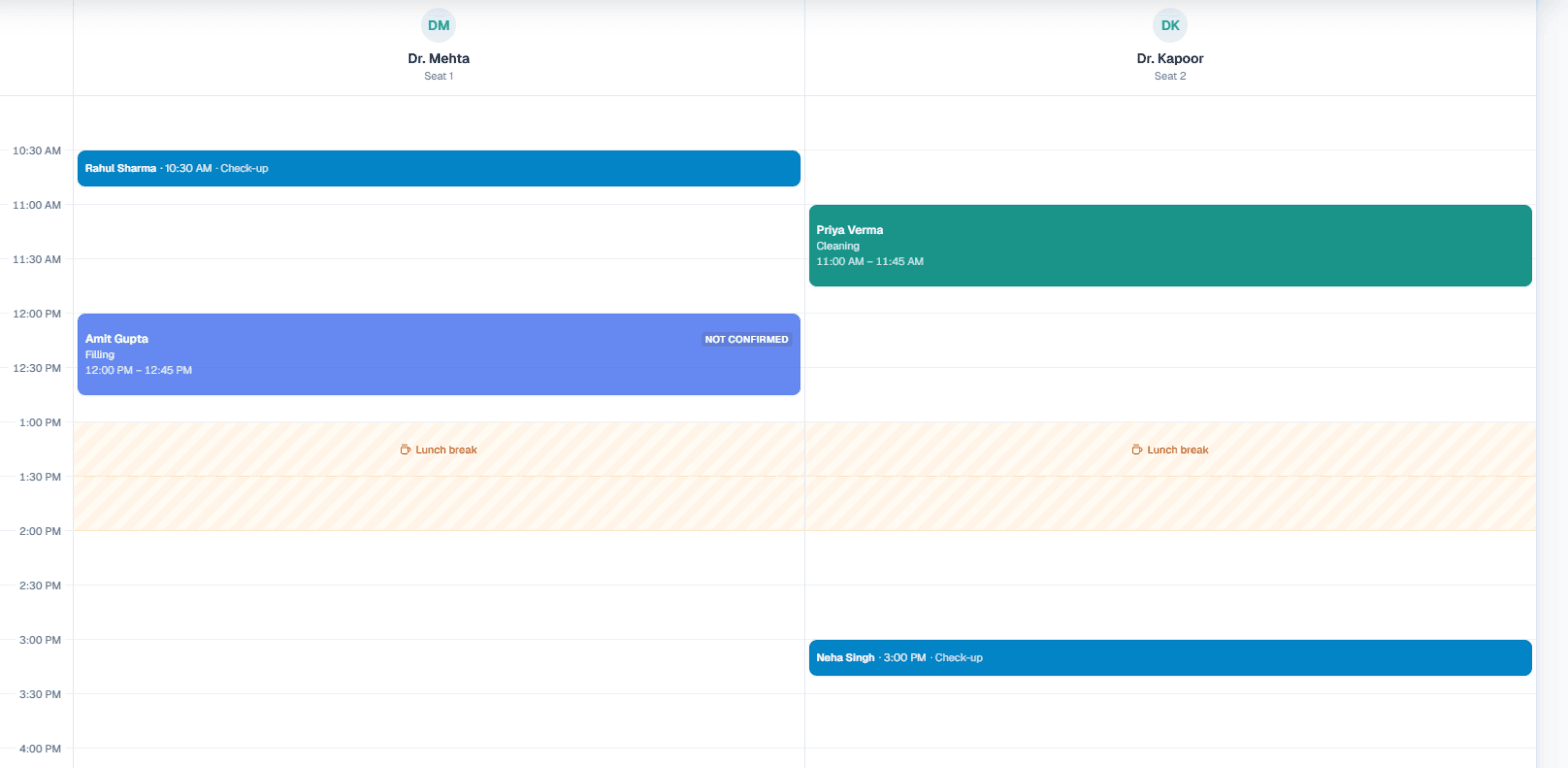
AI appointment booking means a customer rings your business number, an AI voice assistant answers, checks which times are actually free, and books the slot before the call ends. The customer then gets a WhatsApp confirmation with the service, date, time and your address. In MySA Business this runs on Appointments, a calendar built for businesses that sell time on a seat: a salon chair, a clinic room, a service bay.
What the calendar needs to know first
The AI can only offer a time it knows is real, so the work starts with a short six-step setup:
- Services. Pick your kind of business (salon, clinic, dental, spa, gym, car wash and more, or Something else) for a starter list. Each service gets a length, from 5 minutes to 4 hours, and your charge in rupees.
- Seats. One seat is one customer at a time: a chair, a bed, a bay or a doctor, optionally named after the person who works it. Each seat is a column on the Day view.
- Days, hours and lunch break. Nothing is ever offered during the break, on screen or by the AI.
- Booking rules. The largest group one booking can take, the minimum notice, how many days ahead customers can book, and whether AI books on calls.
- Reminder rules. How a confirmed booking is reminded.
Start times are offered every shortest service's length: with a 15-minute service, customers can start at 10:00, 10:15, 10:30, and a 45-minute service takes three of those steps.
How the AI books during the call
With AI books on calls ticked, the assistant on your calls can do four things:
| The customer says | What the AI does |
|---|---|
| "Kal shaam ko haircut ka time hai?" | Checks free times for that service, day and group size, and offers the nearest free times if the asked-for one is taken |
| "Theek hai, 5:30 rakh do, naam Priya" | Books the slot. The phone number comes from the call, so it never asks for it |
| "Mera Thursday wala appointment Saturday kar do" | Moves the caller's own upcoming booking, as the same booking rather than a cancel and rebook |
| "Mujhe cancel karna hai" | Cancels the caller's own upcoming booking |
Before moving or cancelling, the AI asks one short question about why, and saves the answer in the booking's notes. It only ever touches bookings made for the number the customer is calling from, follows your minimum notice, booking window and lunch break, and makes at most one booking per call.
Example
Caller: Hello, Sunday ko facial ke liye slot milega?
AI: Sunday ko 11 baje aur 2:30 baje slot khali hai. Aapke liye kaunsa theek rahega?
Caller: 2:30. Naam Neha likh dijiye.
AI: Ho gaya Neha ji, Sunday 2:30 baje facial book hai. Confirmation WhatsApp par aa jayega.
The booking appears on the calendar straight away with a small robot icon. If a customer agreed a time on a call but it was not booked, it shows as Not confirmed yet with a note, so your team can confirm it.
For the AI to book, you need your Live workspace (Test and Live have separate calendars), Appointments switched on for your business, at least one seat and one service, AI books on calls ticked under Settings → Hours & rules, and inbound calls switched on for the number customers ring.
WhatsApp confirmation, change, reminder and cancellation
For Live bookings, the customer gets a WhatsApp from MySA's WhatsApp number, to the mobile on the booking:
- Confirmed: service, date, time, your address, your Google Maps location and your number.
- Time changed: the new date and time, and your number.
- Reminder: service, date and time, sent between 30 minutes and 1 day before, 3 hours by default.
- Cancelled: which booking, and your number to book again.
A booking marked Not confirmed yet gets nothing until you confirm it, a walk-in gets no messages, and a booking made inside the reminder window gets the confirmation only. Test bookings never send a WhatsApp.
An optional reminder call, off by default, has the AI ring before the booking and ask whether the customer is coming; the answer is saved as a flag and never cancels anything by itself. The full comparison of WhatsApp reminders and reminder calls is in our guide to automated appointment reminder calls.
A copy of every booking in Google Sheets
Click Connect Google Sheet, share your sheet as Editor with the address shown, and paste its link. A Bookings tab then holds every booking from the last 365 days plus everything coming up, with customer, phone, service, price, status and notes. It is rebuilt within a minute of any change, so keep your own notes in a separate tab.
Which businesses it suits
These are scenarios, not customer stories:
- Clinics and dental practices. A seat per doctor, each service with its own length. See the clinic AI receptionist and doctor appointment booking with AI.
- Salons and spas. A seat per chair or bed, with group bookings up to your largest-group rule. See salon appointment booking.
- Coaching demo classes. Choose Something else, make "Demo class" a service and each counsellor a seat.
- Service bays and car washes. A seat per bay, plus the reminder call for fewer no-shows.
Getting started
Sign up, verify your mobile number for ₹100 of Test credit, and build your calendar in the Test workspace to check services, hours and rules. When it looks right, set it up in Live and switch on inbound for your number. The step-by-step is in the Appointments documentation, and the feature overview is on the AI appointment booking page.