
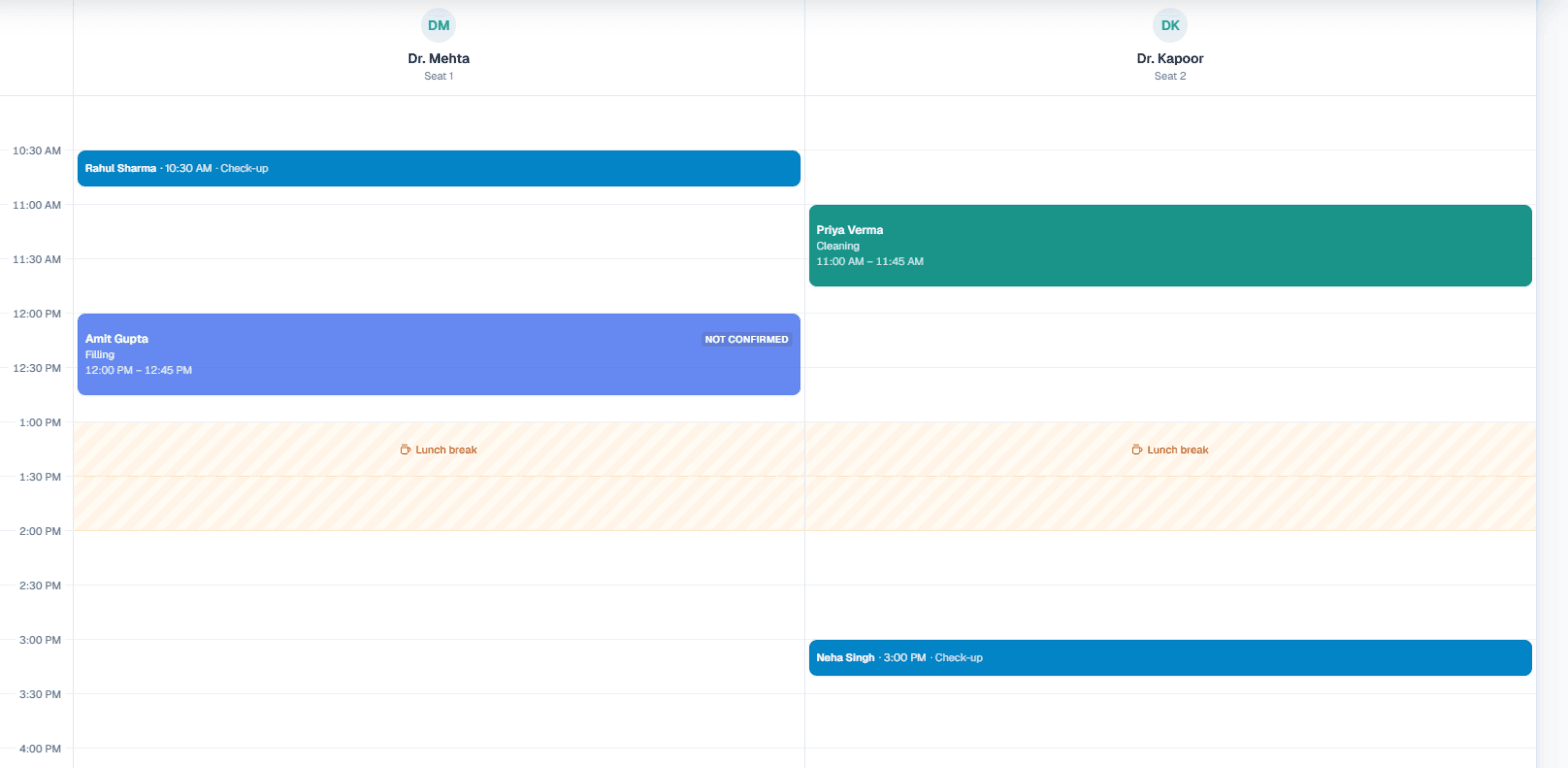
Automated appointment reminder calls are AI phone calls that ring a customer before a booked slot or a planned visit, remind them of the time, and ask whether they are still coming. MySA Business has two features for this, and they are easy to mix up: Appointments, a booking calendar that sends WhatsApp messages and can add a reminder call, and Visit reminders, which places a call on the day of a visit the customer mentioned on an earlier call.
Here is which one sends a message, which one places a call, and which suits you.
Message or call: the short answer
| Situation | Feature | What the customer gets |
|---|---|---|
| A slot is booked, by your staff or by the AI on a call | Appointments | A WhatsApp confirmation |
| The booking's time is changed | Appointments | A WhatsApp with the new time |
| Before the booking (3 hours by default) | Appointments | A WhatsApp reminder |
| Before the booking, if you switch it on | Appointments | A reminder call from the AI |
| The booking is cancelled | Appointments | A WhatsApp saying which booking |
| The customer said on a call "I'll come on Friday" | Visit reminders | A reminder call on the day |
So appointment reminders on WhatsApp are the default, and the call is an option you add. Visit reminders are always calls.
Appointments: AI appointment booking on the call
Appointments is a calendar for businesses that sell time on a seat: a salon chair, a clinic room, a service bay. You set your services, each with a length and a charge in rupees, your seats, your days and hours and a lunch break. The calendar then offers only times that fit.
With AI books on calls switched on, the assistant on your calls can:
- check free times for the service, day and group size the customer asks for, and offer the nearest free times if theirs is taken;
- book once the customer picks a time and gives a name, taking the phone number from the call itself;
- move or cancel the caller's own upcoming booking, after asking in one short question why.
It follows your booking rules and makes at most one booking per call. For the AI to book, you need a Live workspace with Appointments switched on, at least one seat and one service, and inbound calls switched on for the number customers ring. The full feature is on the AI appointment booking page.
Appointment reminder WhatsApp messages
For Live bookings, the customer receives WhatsApp messages from MySA's WhatsApp number, to the mobile on the booking:
- Confirmed: service, date, time, your address, your Google Maps location and your number.
- Changed: the new date and time, and your number.
- Reminder: the service, date and time, sent at the time you choose, from 30 minutes to 1 day before. It starts at 3 hours.
- Cancelled: which booking, and your number to book again.
A booking marked Not confirmed yet gets nothing until you confirm it, and a walk-in gets no messages. A booking made inside the reminder window gets the confirmation only, not a reminder on top. Test bookings never send a WhatsApp.
Adding a reminder call to appointments
The reminder call is off to start with. Switch it on under Settings → Reminders and the AI rings before the booking, says the service and time, and asks whether the customer is coming. Their answer lands on the booking as Confirmed on reminder call, Said not coming or Reminder call: no answer.
Three details matter in practice:
- Calls start at sets the earliest hour a reminder call may ring. A 10 am booking with a 3-hour reminder does not become a 7 am call; it waits until that hour, or is skipped if the booking is by then.
- A "not coming" is only a flag for your team. The call never cancels a booking by itself, though if the customer asks on that call to move or cancel, the AI does it.
- Each reminder call is charged like a visit reminder call from your wallet, and skipped when the wallet cannot cover it.
Visit reminder calls: for visits mentioned on a call
A showroom or property site does not run a slot calendar, but often hears "main Saturday aa jaunga" on a sales call. Visit reminders catch that: MySA reads the visit from the call and places one call on the day to confirm the customer is still coming.
Example
On a Tuesday call, a customer tells a car showroom's AI: "Saturday ko 4 baje test drive ke liye aaunga."
On Saturday at 3 pm, an hour before the time they named, the AI calls:
AI: Namaste Amit ji, aaj 4 baje aapki test drive ke liye showroom aane ki baat hui thi. Kya aap aa rahe hain?
Amit: Haan, thoda late hoga, 4:30 tak.
The timing rules:
- If the customer named a time, the call goes an hour before it.
- If they named only a day, it goes inside your Call between window, 10 to 11 am by default.
- Calls are spread across the window, about ten every five minutes.
And the reasons a reminder may not go out: nothing is sent for a visit planned for today; only one call a day goes to a customer, counting follow-ups; a reminder that could not be placed within 60 minutes of its time is dropped rather than called late; numbers on your WhatsApp exception list are never called; and calls inside your DND hours are held. Visit reminders run only in the Live workspace and are off until someone switches them on. Details are in the visit reminders documentation.
A visit reminder is different from a follow-up. A follow-up is a call the customer asked for ("call me later"); a visit reminder is about a plan they mentioned. Follow-ups are explained in the follow-ups guide.
Which one fits your business
- Salons, spas, clinics, dental practices, gyms, car washes: Appointments, with WhatsApp reminders and optionally the reminder call. See salon appointment booking and the AI receptionist for clinics.
- Showrooms, real estate, coaching, any sales-led business: Visit reminders, because visits are agreed on calls, not booked in slots.
- Both: reminder calls from Appointments also appear on the Visit reminders page with an Appointment label, where you can stop any one with Don't call before it rings.
To try it, sign up, verify your mobile for ₹100 of Test credit, and set up the calendar in the Test workspace; the step-by-step is in the Appointments documentation.