Facebook Messenger automation in Ahmedabad means every message and comment on your Page gets a correct answer in Gujarati, Hindi or English within seconds, even when the shop is shut. MySA Business replies from the Business Details you approved, captures a name and mobile number from interested customers, and calls each new Facebook Lead Ads lead with an AI voice assistant, usually within about a minute of the form fill.
Ahmedabad businesses that sell through Facebook
Ahmedabad is known for its trading culture, its textile history, its food and its festivals, Navratri above all. Some scenarios, not named customers:
- Rooftop solar installers. Ads bring Lead Ads form fills from homeowners who want to know about savings, subsidies and a site survey.
- Study-abroad and visa consultancies. Students and parents ask about countries, intakes and counselling sessions, often late at night.
- Namkeen and snack brands. Festive gift packs and bulk orders lead to Messenger questions about weight, shelf life and shipping.
- Party plots and event venues. Navratri and wedding season bring "date available?" and "capacity kitni hai?" under every post.
Facebook Messenger automation in Ahmedabad: what is included
Sign in with Facebook, pick the Page and choose the Business Details category. Facebook is enabled per workspace, with a limit on the number of Pages.
Messenger replies in Gujarati and more. The AI replies in the language the customer writes in, Gujarati, Hindi, English or Hinglish, and only from your approved details. It will not quote a subsidy amount or a visa outcome that you have not written down.
Reply timing. Answer immediately, or wait 5, 10, 15 or custom seconds (30 at the most) to merge a burst of messages into one reply.
Comment modes for the Page. Off, Public reply, Private reply in Messenger, or Hybrid with a short public acknowledgement and a private message. Only real questions get a reply. Party plots can keep rates private with Private reply.
Templates. An image with text, a card, or a carousel with Link, Call and WhatsApp buttons, sent when a customer uses a keyword, comments a keyword, or when the AI decides one fits.
Lead capture. The first message is answered normally. From the second on, when someone asks about price, booking, availability or a visit, the AI asks once for a name and mobile number. Every Indian mobile number written in a chat is saved as a lead.
See Facebook Messenger automation for the complete list.
Intent-based calling for consultations
A visa consultancy cannot close a counselling session in chat. Intent-based calling ("Call when the customer agrees" in the console) bridges that. When a chat shows real intent and the customer has shared a number, the AI asks once whether your team may call; on a yes, an AI call goes out in the customer's language with a short summary of the chat as context. On a no, it does not ask again. At most one such call a day goes to the same number across Facebook, Instagram and WhatsApp, and DND hours and the wallet apply.
Lead Ads to a call: the rooftop solar example
Lead Ads form fills are handled by a webhook campaign:
- Create a webhook in MySA. Your ad setup or a connector posts each new lead to its URL.
- Map the fields once from the first lead that arrives, without writing code.
- Attach a webhook campaign with the assistant, a purpose such as "confirm roof type and book a site survey", and Gujarati as the call language.
Example
A homeowner fills a rooftop solar form at 9:15 pm. The webhook campaign calls within about a minute. Gujarati is the call language; the call is shown here in English.
AI: Namaste Hetal ben, you just asked about rooftop solar for your home. Is this a good time for two minutes?
Hetal: Yes. We have a bungalow, terrace is free.
AI: That helps. Roughly what is your monthly electricity bill?
Hetal: In summer it goes quite high.
AI: Understood. Our engineer can visit to check the terrace and suggest a system size. Would Sunday morning or Monday evening suit you?
Hetal: Sunday morning.
The call is saved with a recording, an AI summary, sentiment and tags. With Appointments set up, the survey slot can be booked during the call, with WhatsApp confirmation and a reminder.
You set the cap on calls per customer per day and the minimum gap between calls. Calls inside your DND hours are held, not dropped, and a low wallet balance stops calls going out. Successful calls become Positive Leads, deliverable through the Lead Feed.
Live data and staying hands-on
Party-plot dates and festive stock change fast. With Custom APIs enabled, tick your own API under Live data in replies and the AI checks it before it answers. An API that needs the customer's mobile number is skipped in Messenger.
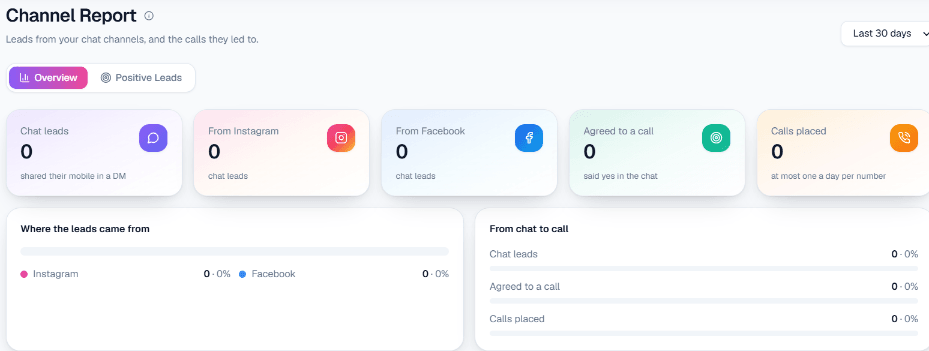
The live inbox shows every conversation, and anyone on your team can reply by hand at any time. There is no automatic handover from the AI to a person. Channel Report shows chat leads, the number from Facebook, how many agreed to a call and how many calls were placed, for any dates you choose.
What works today, and what it does not do
| Works today | Does not do |
|---|---|
| Gujarati, Hindi and English replies on Messenger | Message a customer outside Meta's 24-hour window |
| Four comment modes and keyword templates | Send more than one private message per comment |
| Lead Ads leads called in about a minute, with caps and DND | Send SMS, email or Messenger drip sequences |
| Lead capture, intent-based calling, Channel Report | Hand chats to a person automatically |
Getting started
Sign up, verify your mobile, and use the ₹100 of Test credit in the separate Test workspace. Write your Business Details, connect your Page and test it from a personal account. Post a sample lead to the webhook's Test URL and take the AI call on your own phone. Gujarati, Hindi and English can each be chosen as the call language; listen to Gujarati on a test call before going live. For calling dealer lists and inbound calls, see AI calling software in Ahmedabad.