
Get started
Concepts
A short glossary of the ideas you will meet across MySA Business, and how they relate to each other.
Test and Live
Your account has two workspaces, and you switch between them with the Test / Live switch in the top bar. The label under your business name always tells you which one you are in.

| Test | Live | |
|---|---|---|
| Who can be called | Only numbers on your Test Numbers list | Any number |
| Wallet | Separate Test wallet; ₹100 welcome credit once the owner verifies their mobile number | Live wallet, topped up from Billing |
| Purpose | Trying things safely | Real customers |
Build and check in Test, then do the same in Live. Purposes are shared across both. Some features run only in Live: inbound calling, DND, Lead Feed, Visit reminders and Call transfer.
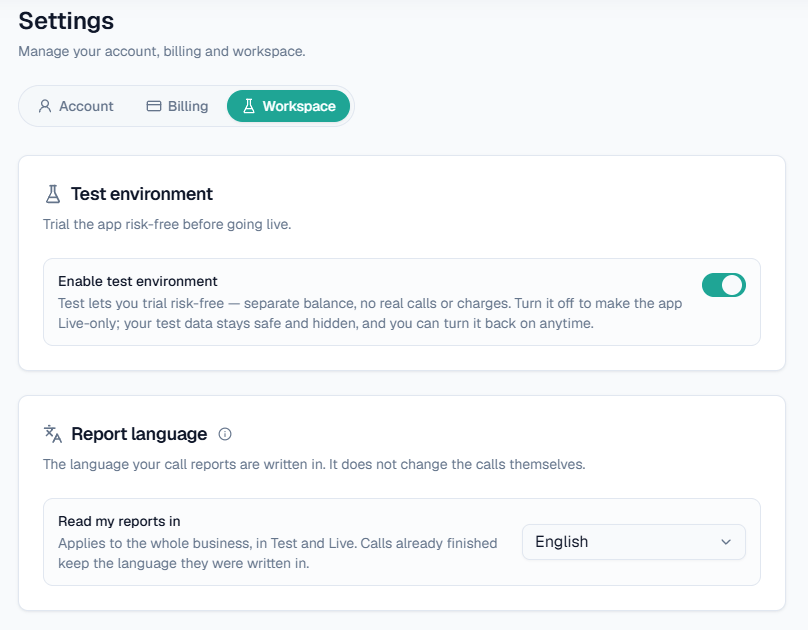
Only the workspace Owner can switch the Test environment off, under Settings → Workspace. When it is off, the switch disappears and the app runs Live-only. Nothing is deleted, and you can switch Test back on at any time.
You can switch the Test environment off for a Live-only console in Settings → Workspace, which is also where you pick the language your call reports are written in.
Wallet and prepaid billing
Calls are prepaid from your wallet. A few rules are worth knowing:
- Before a call is dialled, its maximum possible cost is held. After the call it settles to the actual charge, so a call can never take you below zero.
- Your balance also limits how long a call may run. If it covers two minutes, the call is set to end after two minutes.
- Calls of 10 seconds or less are free. After that, on the standard per-minute plan you are billed per started minute, so an 11-second call and a 59-second call both count as one minute.
- If the balance will not cover even one billable minute on Live, the call waits in the queue and dials itself once you top up. If it is still unfunded after about 10 minutes, it is cancelled.
You add money from Billing with Add Balance (UPI, card or netbanking) or Request payment (bank transfer). GST at 18% is added on top and is never credited to your balance. See Wallet and pricing.
Assistants and purposes
An assistant is the AI voice that speaks to your customer. Ready-made assistants appear on Home, where you can try them with Try now.
A purpose is the wording that tells the AI what to achieve on a call, for example "confirm the order and ask for a delivery time". You save purposes in Business → Purposes and pick them from the Use a saved purpose dropdown on campaigns, test calls and inbound settings. See Assistants and purposes.
Business Details
Business Details is the knowledge the AI answers from: your products, prices, branches and policies, built per category from files you upload. A category has to be approved before it goes live and can be used on calls. See Business Details.
Campaigns
A campaign is a batch of outbound calls that share one purpose, language, caller ID and Business Details category. Contacts arrive in one of four ways: CSV Upload, API, Single Call or Webhook. A new campaign is a draft until you press Publish & Run. See Campaigns.
Call Logs and reports
- Call Logs is where you find out what happened on a particular call: status, duration, charge, recording and AI summary.
- Detailed Report lists every call in a date range, with filters and a CSV download.
- Analytics shows call volume, success and spend over time.
A call counts as connected when it had talk time. See Call logs and Analytics and reports.
Follow-ups
When a customer asks to be called back, the request appears under Follow-ups. You can call now or let auto-callback dial at the requested time. See Follow-ups.
Team and roles
The Owner invites teammates from Team. Roles are set per environment, so someone can have Test access, Live access or both, each with its own role. Custom roles let you choose exactly which permissions a member has. An Owner is never downgraded. See Team and roles.